Introduction
Pivot Trees are a flexible and powerful way to navigate and power your reporting in ActivityExchange. Each Pivot Tree allows a different hierarchical view of your activities utilising any available data point.
Where can I find them?
The Pivot Trees panel is located in the top-left of the screen when logging in to a project as shown here:
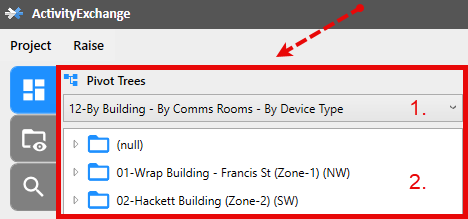
- The dropdown allows you to choose which Pivot Tree you want to currently use.
- This is the actual Pivot Tree. Activities are grouped by the data point that has been defined for the Pivot Tree and dynamically placed into folders.
Where to configure Pivot Trees
We understand that Teams will probably want to look at their activities differently to the overall Project. This is why we have made Pivot Trees configurable at both the Project level and the Team level so that each group can have their own. For the purposes of this article we will focus on the Project level however the same can be applied for each Team Administrator also. How To: Open configuration windows for your project and its teams.
Select the Pivot Trees tab:
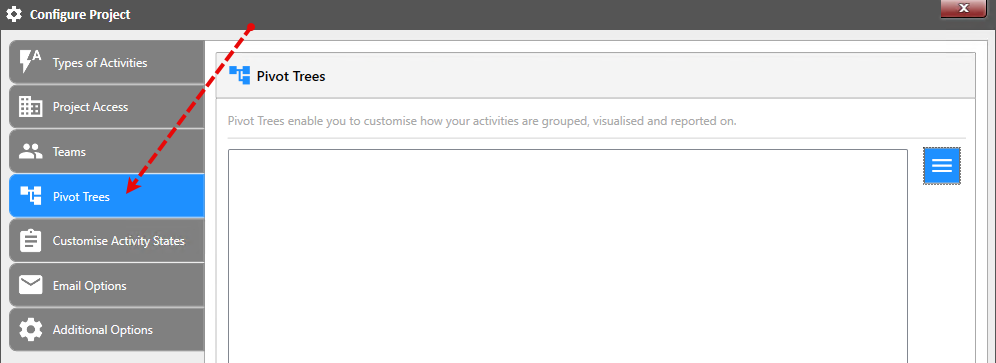
How to add a new Pivot Tree
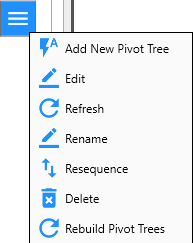
Select "Add New Pivot Tree" from the available menu:
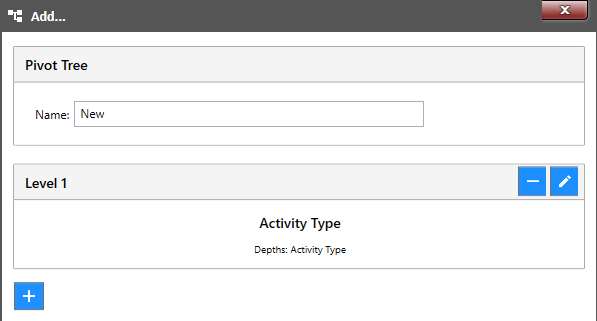
This will open the following window which allows you to name and configure your new Pivot Tree: