Introduction
Sometimes we forget our passwords. It happens to the best of us. Below is the simple procedure to assist you to reset your password and continue uninterrupted.
How to Reset Your Password
Step 1: Start the Reset Process
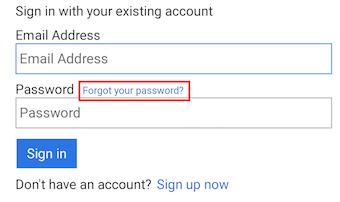
At the sign in page, select "Forgot your password?".
Step 2: Enter Your Email
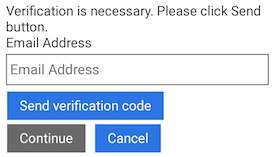
The next screen will request you to enter your email address so that you can be sent a "verification code".
Step 3: Verify Your Code
An email will be sent to your nominated email account which will contain your verification code. Enter the verification code from your email and select "Verify Code".
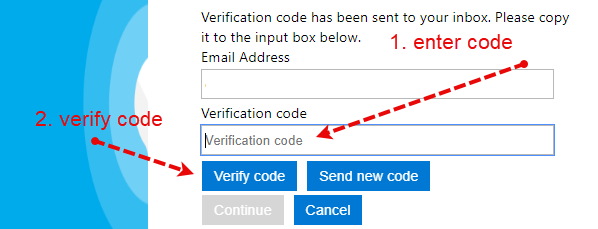
After a few seconds the system will verify your code and you will be asked to enter your new password.